Getting more Google reviews is one of the fastest ways to boost your local SEO, build trust, and increase conversions. But the real challenge is simple: how do you make it effortless for customers to leave a review? Two popular solutions have emerged—NFC Google review cards and QR review stickers. Both are designed to streamline the review process, but they work differently and suit different business needs.
In this guide, we’ll break down how each option works, compare their pros and cons, and help you decide which one is best for your business.
1. What Is an NFC Google Review Card?
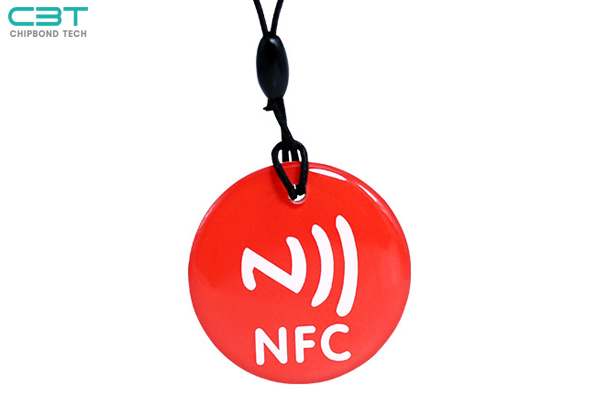
An NFC Google review card is a physical card embedded with a small NFC (Near Field Communication) chip. When a customer taps the card with their smartphone, it instantly opens your Google review page—no apps, no typing, no searching.
How it works:
· Customer taps the card with their phone
· The phone automatically opens your Google review link
· Customer leaves a review in seconds
Why businesses use it:
· Frictionless experience (no scanning required)
· Feels modern and high-end
· Great for face-to-face interactions
NFC cards are commonly used in restaurants, salons, real estate, and service-based businesses where staff can directly prompt customers.
2. What Is a QR Review Sticker?
A QR review sticker is a printed code that customers scan with their phone camera. Once scanned, it directs them to your Google review page.
How it works:
· Customer opens camera or QR scanner
· Scans the code
· Taps the link and leaves a review
Why businesses use it:
· Extremely affordable
· Easy to create and print
· Works on almost any smartphone
QR stickers are often placed on doors, tables, receipts, packaging, or checkout counters.
3. NFC Google Review Cards vs QR Review Stickers
Let’s compare both options across key factors that impact customer behavior and review conversion rates.
3.1 Ease of Use
· NFC Cards: Just tap—no need to open the camera or scan anything
· QR Stickers: Requires opening the camera and scanning
Winner: NFC
The fewer steps, the higher the chance a customer completes the review.
3.2 Customer Experience & Professional Impression
· NFC Cards: Feel innovative, premium, and interactive
· QR Stickers: Functional but more common and less impressive
If branding matters, NFC gives a stronger first impression.
3.3 Cost Comparison
· QR Stickers: Nearly free (just printing costs)
· NFC Cards: Higher upfront cost due to embedded chips
Winner: QR for budget-conscious businesses.
3.4 Compatibility
· NFC Cards: Not all older phones support NFC
· QR Stickers: Works on almost every smartphone
Winner: QR for universal accessibility.
3.5 Conversion Rate (Most Important)
· NFC Cards: Faster interaction → higher likelihood of action
· QR Stickers: Slight friction → lower completion rate
In real-world use, NFC tends to generate more reviews per interaction.
4. Which One Fits Your Business Better?
Choosing between NFC and QR depends on your business type, budget, and customer interaction style.
Best for NFC Google Review Cards:
· Restaurants with table service
· Salons and spas
· Real estate agents
· Automotive dealerships
· High-end or premium brands
Ideal when you can personally prompt customers to leave a review.
Best for QR Review Stickers:
· Small businesses with limited budget
· Cafes or fast-service restaurants
· Retail stores with high foot traffic
· Delivery or takeaway businesses
Perfect for passive review collection.
5. Can You Use Both Together?
Yes—and this is actually the most effective strategy.
Smart combination approach:
· Place QR stickers at entrances, windows, and receipts
· Use NFC cards at checkout or during customer interaction
This way, you:
· Capture both passive and active users
· Maximize exposure
· Increase total review volume
6. How to Make an NFC Card for Google Reviews
Creating your own NFC review card is easier than you might think.
Step-by-step:
1. Get your Google review link
· Search your business on Google
· Click “Write a review”
· Copy the URL
2. Buy an NFC tag or card
· Available online (NTAG213 or similar recommended)
3. Write the link to the NFC chip
· Use apps like NFC Tools (iOS/Android)
· Paste your review link
4. Test the card
· Tap with multiple devices to ensure it works
5. Design your card
Add logo, CTA like “Tap to Review Us”
7. What Is an NFC Business Card for Google Review?
An NFC business card for Google reviews is essentially a smart card that combines traditional networking with digital functionality.
Instead of just sharing contact details, it can:
· Direct customers to your review page
· Share your website or social links
· Enhance brand perception
Think of it as a modern upgrade to both business cards and review requests.
8. Final Verdict: NFC or QR — Which Should You Choose?
There’s no one-size-fits-all answer, but here’s a simple breakdown:
· Choose QR stickers if you want a low-cost, scalable solution
· Choose NFC cards if you want higher conversions and a premium experience
· Use both if you want the best results
If your goal is to maximize Google reviews and stand out from competitors, NFC cards offer a clear advantage—but pairing them with QR codes delivers the strongest overall strategy.
Want a Faster, Smarter Way to Collect Reviews?
At CBT, we specialize in helping businesses turn everyday customer interactions into powerful review opportunities.
Our solutions include:
· NFC Google Review Cards (tap-to-review in seconds)
· Custom QR Review Stickers (affordable and scalable)
· Branded designs to match your business identity
· Easy setup—no technical skills required